The Beltway App
Our Mobile App Just got more personal
Access your personalized Member Dashboard, see your next steps, discover content and events you want, and find what you need to stay connected at Beltway—all in one place.
Access your personalized Member Dashboard, see your next steps, discover content and events you want, and find what you need to stay connected at Beltway—all in one place.
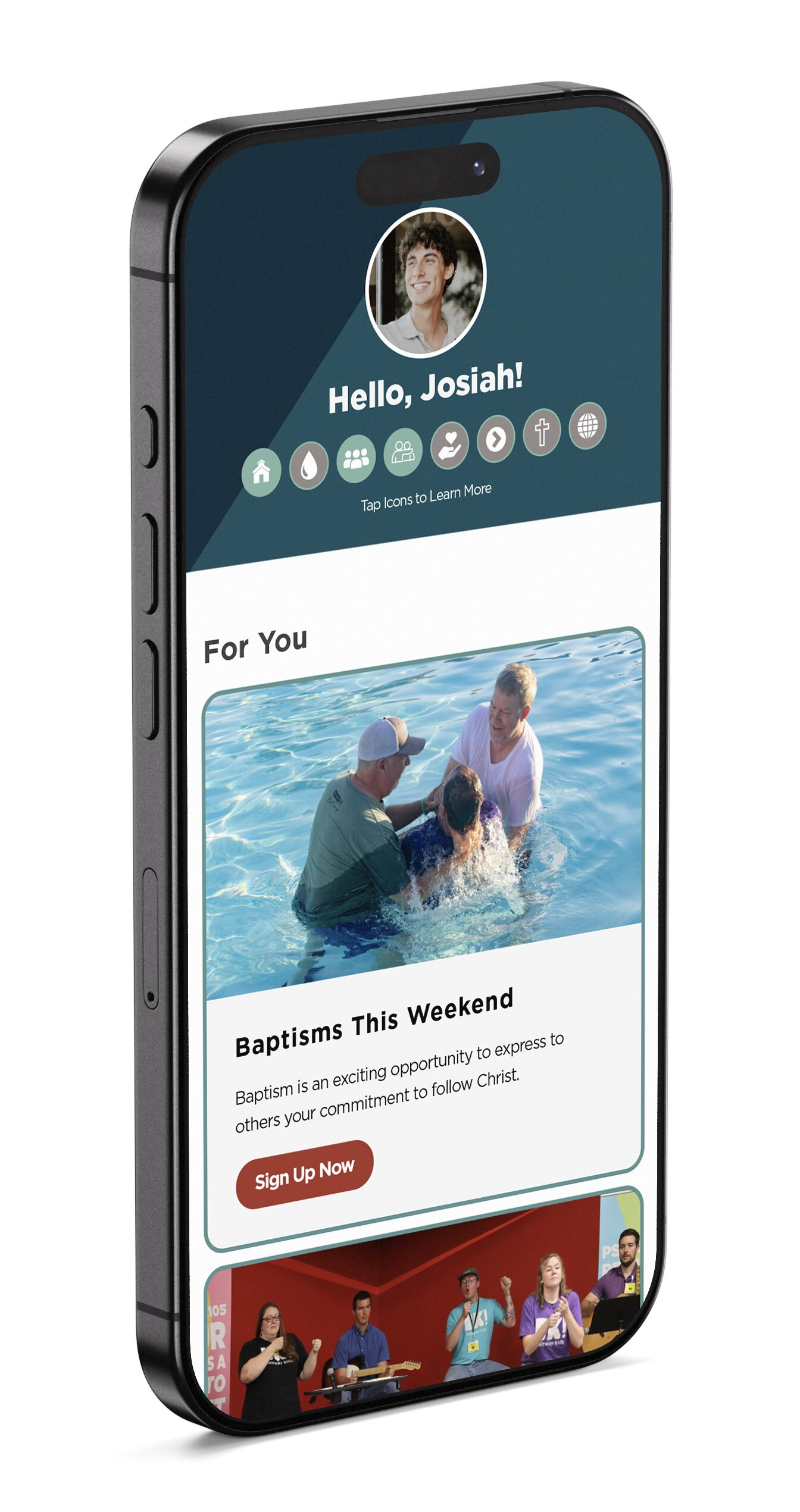
Download or update the Beltway App, log in, and explore your personalized Member Dashboard today.

We believe that in order to grow in our faith, we should actively and regularly worship in a community of believers. We have a few indicators of regular attendance such as when you check in to serve or you check a child into Children’s Ministry.
Your ATTEND icon will turn blue if you have attended service 4 times in a rolling 16 weeks. If you have attended regularly and your badge icon is not blue, please contact us at

We believe that BAPTISM is a public declaration of faith in Jesus and a significant step of obedience in the life of a believer.
Your BAPTISM icon will turn blue once you’ve attended the baptism class and you have been baptized by immersion at Beltway Park Church. If you have been baptized by immersion outside of Beltway Park Church, let us know by updating your profile inside the app. This badge does not unlight.

We believe true, authentic life change happens best in the context of community. We were never meant to do life alone — we are better together!
The GROUPS icon will light if you are connected to an active Life Group, Topical Group, or Short-term Group within Beltway Park Church or if you are involved in re|engage. This icon will unlight when the criteria is no longer being met.

We believe serving others is one of the most effective ways to live out your faith. In a world focused on personal gain, there is perhaps no greater way to show others what a life devoted to Christ is about.
Your SERVE icon will turn blue when you’ve been added to a serving roster at Beltway Park Church. Some ministries use platforms other than Park Central (CCB) to manage their serve teams. If you’re currently serving but your Serve badge is not blue, it may simply mean your ministry tracks serving through a different system. This icon will unlight when the criteria is no longer being met.

At Beltway Park Church, we believe generosity matters! Giving is a biblical principle designed to teach us to trust God daily for all of our needs. When we give, we demonstrate our reliance and gratitude to God for all that He provides for us.
Your GIVE icon will turn blue if you have given at least 4 times in the past 16 weeks OR if you have given at least $500 in a rolling 12-month period OR at least $5,000 in a rolling 12 months. Giving will be combined for spouses and the icon will light for the adults in the household. This icon will unlight when the criteria is no longer being met.

Membership unpacks the vision of Beltway Park, our core values, and central beliefs. Become part of the team making a difference in our city and in the nations.
Your MEMBERSHIP icon will turn blue upon completion of the Membership Class at Beltway Park Church.

Freedom is God’s answer to everything that captures, binds and hinders our walk with Jesus and the purpose He has for every believer.
Your FREEDOM icon will turn blue after completing the Freedom in Christ class at Beltway Park Church.

At Beltway Park, we believe everyone is called to take the gospel to those that do not know Jesus. Whether you GO, PRAY, or GIVE, we all have a role to play in the Great Commission.
Your MISSIONS & OUTREACH icon will light if an individual is on the roster of an active group within the Group Type of Missions & Outreach. This icon will unlight when the criteria is no longer being met.
Step 1: Create an account and verify your identity using your phone number or email.
Step 2: Log into your Park Central account or create a new one. If creating a new account, please allow up to 24 hours for your dashboard to appear.
Step 3: Start scrolling through personalized and relevant content made just for you!
Visit the App Help Desk during weekend services the first two weekends of October. After that, please email .
Complete the Update My Profile Form in the app. Due to the high volume of updates at this time, please allow 2-3 weeks for changes to be reflected on your personalized dashboard. We appreciate your patience as our team works to make your app more personal!
If you open a link or form within the app but don’t want to complete it right away, click the X in the bottom right-hand corner. Then click on the View My Dashboard tile.
If you receive an error message while trying to verify your account, please go back to the beginning and try again.
If the problem persists, please contact our app support team by emailing .
Please contact our app support team by emailing